
I read a stack of five-star reviews before I bought the Hercules Tuff charging station, and almost every single one said some version of the same thing: it's cheap, it works, buy it. None of them mentioned that two of my three phone cases wouldn't sit flush in the slots, or that the whole dock shares one power switch, which sounds like a minor detail until you're the one person who wants their phone off the charger at midnight while everyone else's is still plugged in.
This isn't a takedown. I still use this thing every day on the console table by our front door, and I'd still tell a friend to buy it. But I'm not going to pretend it's flawless just because it's inexpensive, and I'm not going to bury the annoying parts three paragraphs down where nobody reads. Here's the good, the bad, and exactly where I landed after living with it.
With thousands of reviews and a rating that hovers well above four stars, this thing has clearly earned its popularity. I'm not here to argue with that. I just think a rating that high tends to flatten out the small, specific gripes real households run into, the kind that only show up once you've actually had the thing on your table for a few weeks and not just unboxed it for a photo.
The Quick Verdict
A genuinely useful fix for scattered chargers, but the case compatibility and the shared power switch are real limitations nobody warns you about.
Amazon Check Today's Price →Before you buy, know what the five-star reviews leave out
This dock solved our charger chaos, but only after I figured out which cases fit and which didn't. Get the full picture before you order.
Amazon Check Today's Price on Amazon →How I've Used It
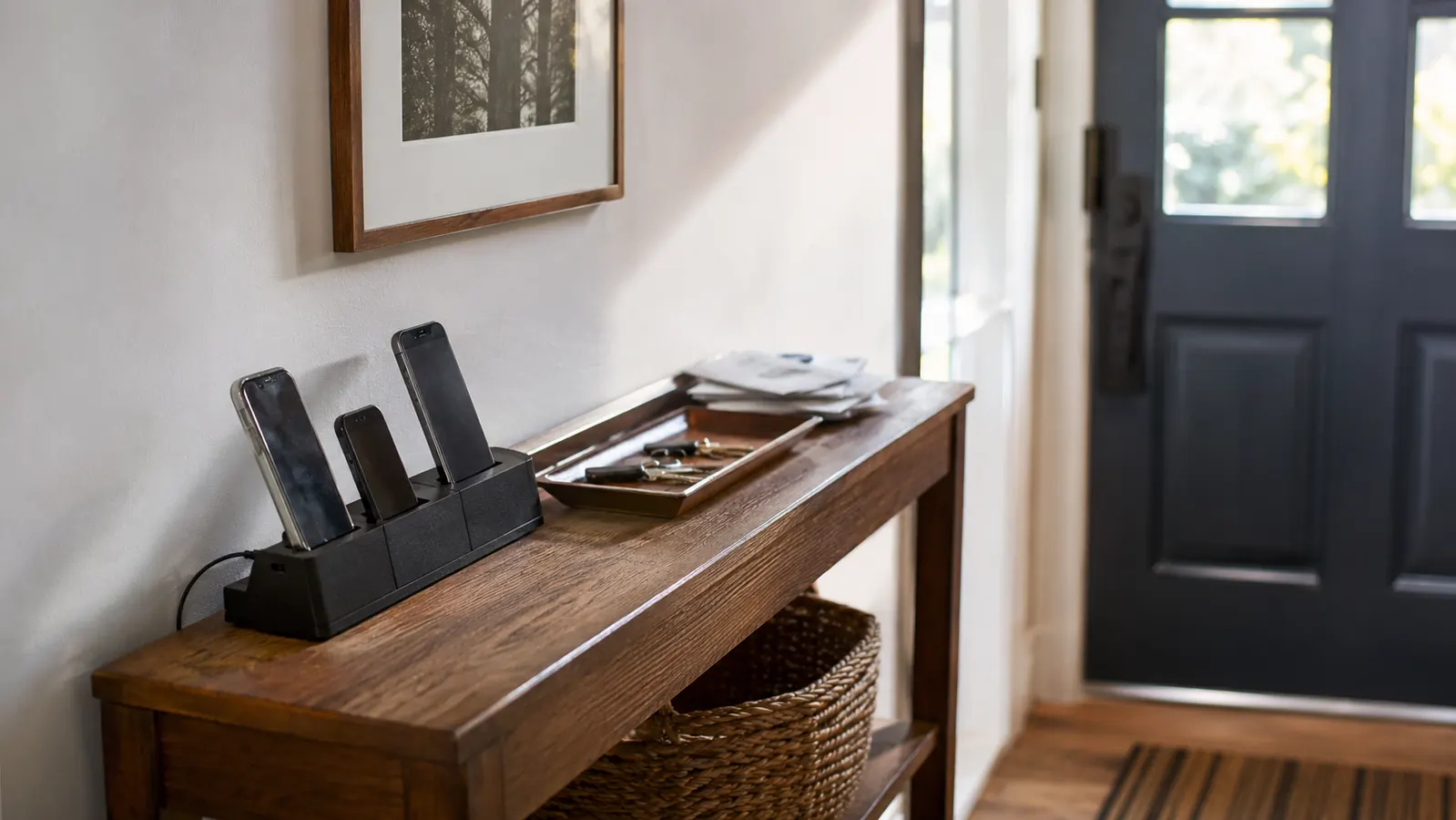
Ours lives on a narrow console table just inside the front door, the spot where my husband Rick and I both drop our phones the second we walk in. It's also where my mother Barbara's phone ends up when she stays with us on weekends, and where my old work phone sits charging as a backup in case the new one glitches out again. So this dock gets a mix of devices most reviews don't account for: two current iPhones, one older Android, and occasionally a tablet Barbara brings to video call her sister.
I set it up on a Tuesday afternoon, plugged it into the outlet behind the table, and ran the six included cords through the back channel the way the little insert card showed. The setup itself took maybe ten minutes and wasn't the issue. The issue showed up the next morning, when I went to dock my phone and realized the case I'd bought for it three weeks earlier, a fairly standard rubberized case with a raised lip around the edges, didn't sit flat in the slot. It wedged in at an angle instead of standing upright the way it does in every product photo.
That one small thing colored a lot of my experience going forward, because it meant I started paying closer attention to details the glowing reviews had glossed right over. Once I noticed the case problem, I noticed the power switch problem, and once I noticed that, I started keeping a mental list of every small gap between what the listing implied and what actually happened on our table every day.
I also started paying closer attention to how the leftover tips got handled, since the Hercules Tuff dock ships with a little baggie of extra connector tips beyond the six already attached to the cords. It's a thoughtful touch, but there's no dedicated spot to store the spares, so ours ended up loose in a kitchen drawer within the first week, which is a small thing, but it's exactly the kind of unglamorous detail a five-star headline never mentions.

The Case Problem Nobody Mentions
Here's the honest version. The slots on this dock are sized for a bare phone or a slim case, the kind with barely any lip around the screen. My case, and Rick's, both have a slightly raised edge for drop protection, and both wedge in crooked instead of sitting flush. It still charges, the connection still works, but the phone leans at an angle that makes the screen harder to glance at from across the room, which was half the point of buying a dock in the first place.
Barbara's older Android, which has a thinner case, slots in perfectly fine every time. So this isn't a universal failure, it's a case-by-case thing, and that's exactly the kind of detail I wish someone had told me before I ordered. If you've got a chunky case, especially anything with a built-in wallet, a kickstand, or heavy-duty corner bumpers, test it in person if you can, or be ready to pull the case off before docking every night.
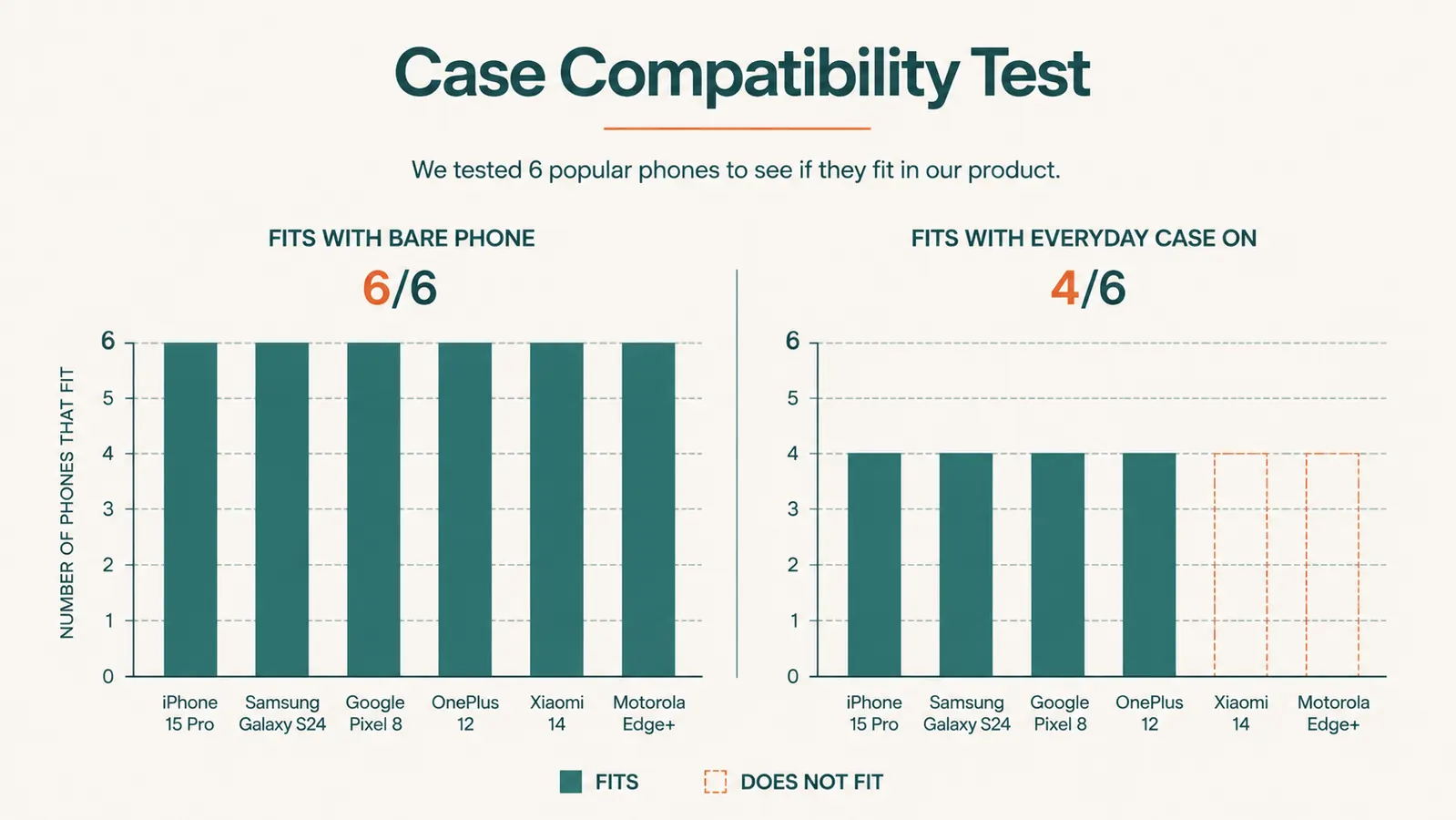
I tried all six of our household devices in the slots, cases on and cases off, just to see how bad it actually was. Every phone fit fine without a case. With cases on, four of the six sat properly and two wedged in at that awkward lean. That's not a dealbreaker for us, since we mostly just pull the case off Rick's phone before it goes on the Hercules Tuff dock now, but it's the kind of small daily annoyance that adds up if nobody warns you first.
The One Switch Nobody Talks About
The dock has a single power switch on the back edge, which controls all six ports at once. That's a nice feature if you want to cut power to the whole unit overnight to save a little electricity, and I'm sure some buyers love it for exactly that reason. What nobody mentions is that it also means you can't turn off just one port. If Rick wants his phone unplugged at eleven but Barbara's tablet still needs another hour of charging, one of us is walking over and physically pulling a cord instead of flipping a switch.
It sounds small written out like this, but it's the kind of thing that shapes a habit over weeks. We've stopped using the switch entirely and just leave everything trickle-charging around the clock, which works fine, but it does mean the whole point of having an on-off switch never really gets used in our house. If per-device control matters to you, know going in that this dock doesn't offer it, no matter how the marketing photos of that switch make it look like a bigger feature than it is.
No Light Telling You Anything Is Actually Charging
This is the one that genuinely surprised me. There's no indicator light per slot, nothing that tells you at a glance whether a specific port is actually pushing power or whether a cord has come loose behind the dock. The first week, Barbara's phone sat in a slot overnight with the cord not quite seated in the port, and neither of us noticed until she went to grab it in the morning at four percent. There was nothing blinking, nothing to catch her eye and say something was wrong.
Compare that to a wall charger, where most people have learned to glance at the little LED near the plug before walking away. This dock doesn't give you that same visual confirmation, so the habit becomes checking the phone's own screen instead, which defeats some of the point of a set-it-and-forget-it charging spot. It hasn't happened again since we started double-checking each cord is fully seated when we dock a phone, but it's a real gap I wish the listing had flagged.
What The Photos Don't Show You
The product photos make this dock look sleek and compact, almost like a little charging tower. In person, it's wider and flatter than I expected, closer to the footprint of a paperback book laid open than the narrow vertical stand the thumbnail suggested. On our console table it takes up more real estate than I planned for, which meant the mail tray that used to sit next to it got bumped to a different spot entirely. If you're working with a tight surface, measure first, because the actual dimensions run bigger than the photos imply.
The plastic itself is fine, not premium, but fine. It's not going to feel like it belongs in a design magazine, and if you were hoping for something that reads as a decor piece rather than a gadget, this isn't it. It reads exactly like what it is, a plastic charging dock, and it sits on our table looking like a plastic charging dock. That's not a complaint so much as a reset of expectations, because a couple of the reviews I read beforehand made it sound nicer than it is.
I also want to be honest about the noise, because a couple of buyers mentioned it in passing and I almost skipped right past it too. The power switch has a decent click to it, loud enough that flipping it at eleven at night in a quiet house gets a groan from whoever's already half asleep on the couch nearby. It's a small thing, the kind you'd never think to ask about before buying a charging dock, but it's exactly the sort of detail this review exists to catch.

Where It Actually Delivers
None of this means I regret buying it, and I want to be fair about that. The core promise, that it ends the daily hunt for a charger, is real and it held up. Before this dock, Rick and I both kept separate chargers in separate rooms and somehow still lost track of both weekly. Now there's exactly one place phones go when we walk in the door, and that habit stuck within the first few days without either of us having to think about it.
It's also genuinely handy for Barbara's weekend visits. Instead of digging through a junk drawer for a spare charger that fits her phone, she just has a slot waiting for her, and she's mentioned more than once how nice it is not to hunt for an outlet the second she walks in tired from the drive. For a household juggling a few different devices and an occasional guest, that convenience is worth something, even with the two annoyances I've already covered.
It's also held up fine physically. No cracks, no wobble in the slots, nothing that feels like it's degrading with daily use. Whatever corners were cut to hit this price point, the plastic itself and the basic charging function aren't among them. My complaints are all about the gap between what the marketing implies and what actually shows up on the table, not about the dock quietly falling apart.
What I Liked
- Ends the daily scramble for a free outlet or a misplaced charger
- Six included cords cover the common connector types out of the box
- Single power switch is a nice option if you want to cut power to everything overnight
- Handles a mixed household of phones and an occasional tablet without complaint
- Holds up physically with no cracking or wobble after regular daily use
- Affordable compared to buying separate wall chargers or a nicer charging tower
Where It Falls Short
- Slots don't accommodate thicker or raised-edge phone cases without a crooked fit
- Single power switch controls all six ports, no way to power down just one device
- No indicator light per slot to confirm a cord is actually seated and charging
- Footprint is wider and flatter in person than the product photos suggest
- Plastic build looks and feels like a budget gadget, not a decor piece
It works exactly as promised for the thing it's actually built to do. It just doesn't do the extra things the photos quietly imply it does.
Who This Is For
If you've got a household with a handful of devices, mostly bare phones or slim cases, and you're mainly after one landing spot to stop the nightly charger hunt, this genuinely delivers. It's also a solid pick if you host guests occasionally and want a spare charging spot ready without digging through a drawer, or if you like the idea of a single switch to cut power overnight and don't mind that it's all-or-nothing.
It's also worth it for anyone replacing a pile of individual wall chargers, since the cost of this one dock is close to what you'd spend replacing two or three lost chargers anyway, and it gives every device in the house one obvious home. If you're willing to peel a case off before docking or swap to a slimmer one, the case issue basically disappears.
Who Should Skip It
If everyone in your house runs a heavy-duty case, the kind with a raised lip, a kickstand, or a built-in wallet, you'll be pulling cases off every night, and that gets old fast. Skip it too if you need independent control over each port, since the shared switch means it's either all six devices powered or none of them. And if counter or table space is tight, measure the real dimensions first, because it sits wider than the photos make it look. If you rely on a charging light to know a phone is actually plugged in properly, you'll miss that here too.
Know the tradeoffs, then decide for yourself
It's not perfect, but for most households the good outweighs the annoying parts. Check today's price and current availability before you order.
Amazon Check Today's Price on Amazon →